Arka Studio

Your shots, files and feedback. One workspace.

Mac · Apple silicon · Windows

Explore the workspace
AeAfter Effects
HHarmony
PsPhotoshop

Less searching.
More making.

Explore Arka’s live workspace, from shot setup to review.

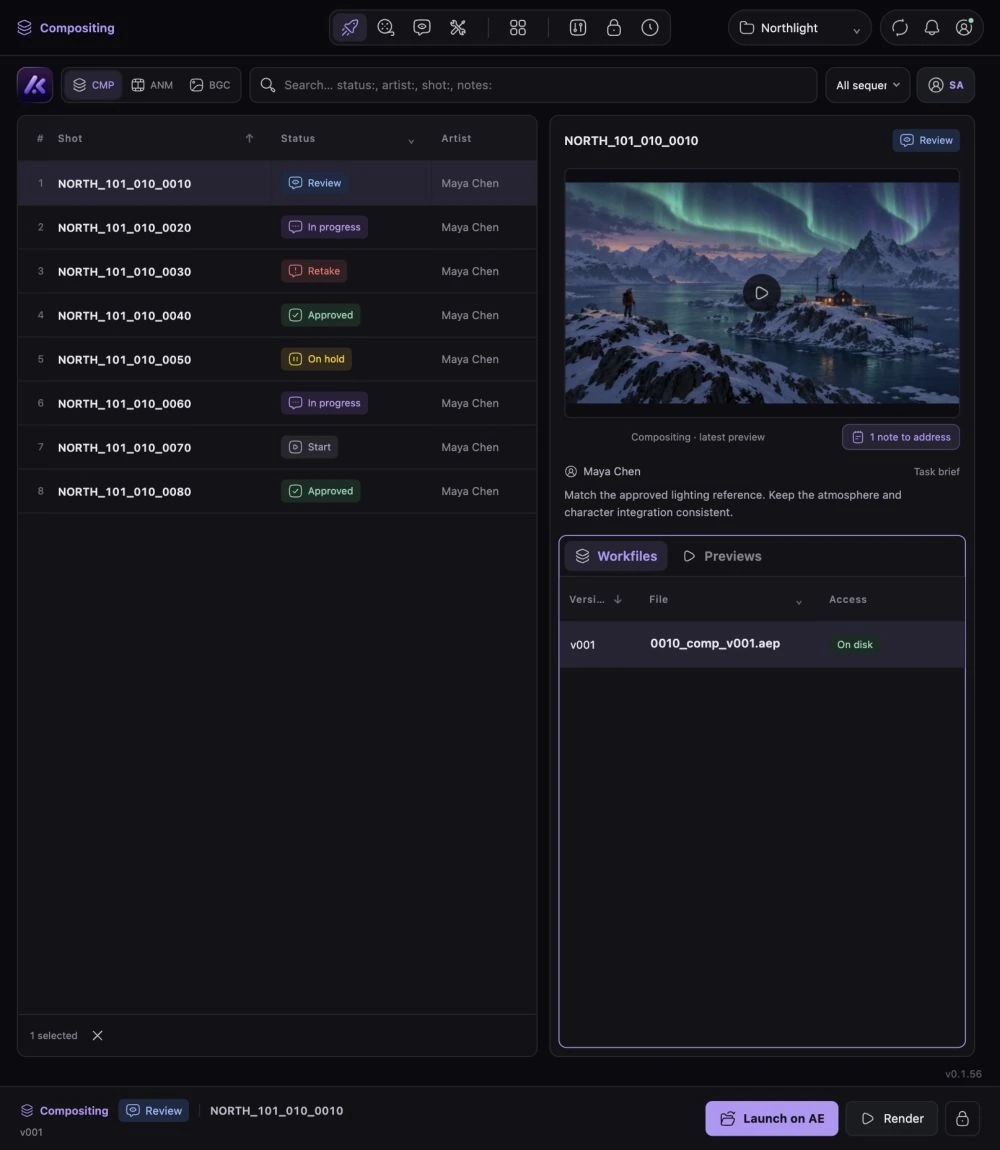
Northlight demo in the Studio Launcher

Launcher

Find assigned shots, check the brief and open the right workfile version in your creative app.

FROM SETUP TO DELIVERY

A pipeline your
team can follow.

Set the project up once.
Give every workstation the same structure.

01

Define the project.

Blueprint sets the folder structure, shot names, applications and version rules. Each artist maps the shared storage on their own machine.

Explore Blueprint
NORTHLIGHTANM Harmony scenes & framesBGC Background workfilesCMP Comps, previews & publishesLIB Templates & shared tools
02

Give every shot an owner.

Assign tasks, add a brief and set the status. Artists find their work in Launcher, choose the right version and open it in the connected application.

Explore Launcher
  • Assignments and shot briefs
  • Versioned workfiles
  • Edit locks for shared work
03

Prepare, then run the batch.

Check incoming assets before assembly. Pick scripts, tune settings per shot and queue work on the desktop. Inspect each result before continuing.

Explore Render
  • Pre-comp readiness checks
  • Per-shot script parameters
  • Local queues and results
04

Review the version, not a loose file.

Play previews, draw on frames and leave timecoded notes. Artists follow the feedback for that version, with notes available as After Effects markers.

Explore Review
  • Timecoded notes and replies
  • Frame annotations
  • Feedback tied to a version
05

Follow through to approval.

Resolve notes, update task status and publish the selected preview. Production can track workload and outstanding feedback from Dashboard.

Explore Dashboard
  • Status and workload overview
  • Open review notes
  • Published previews

Your tools. One place.

Plugins and panels for the whole team.

Share.

Admins add Mac and Windows packages from the shared Library or Tools folder.

Explore Add tool

Install.

Browse approved versions by task, sequence or artist. Install from the desktop app.

Browse demo tools

Native installation requires the desktop app. Tool licenses are separate.

PEOPLE & ACCESS

Built for the whole team.

Artists, supervisors and admins have their own controls. Finance can manage billing on the website without using a production seat.

Artists

Find assigned shots, open workfiles and publish work for review.

Supervisors

Review versions, leave notes and keep shot status up to date.

Admins & finance

Manage the team, project access and monthly seats from the browser.

PRICING

Your team.
Your pipeline.

Flexible seats, or development tailored to your studio.

Arka Studio

Monthly

—per paid seat / month

Loading local pricing…

  • Workfiles and shot tracking
  • Batch automation and render queues
  • Frame review and versioned notes
  • Blueprint, shared tools and team access
Choose your seats

Cancel anytime. App licenses and storage are separate.

Development

Custom scope

€499EUR / development engagement

Make Arka fit the way your studio works.

  • Custom workflow development
  • Pipeline integrations
  • Studio-specific tools and customizations
  • Scope and delivery agreed together
Contact us

Contact only. Seats and ongoing development quoted separately.

GOOD TO KNOW

A few practical details.

How do we get started?

Sign in with Google to create a team or accept an invitation. A team owner can buy seats on the website. Once a seat is available and payment is confirmed, set up the project, install the desktop app and map its folders on each workstation.

Where do our workfiles live?

On your own storage. Arka coordinates project settings, access, status and review notes. Workfiles, renders and review images use the folders defined in Blueprint, so each workstation needs access to those shared folders.

Which systems and applications are supported?

Arka runs on Apple silicon Macs (macOS 12 or later), and Windows PCs. It connects workflows for After Effects, Toon Boom Harmony and Photoshop. The After Effects CEP panel provides access to your project library and production actions inside AE. Application licenses are separate.

Does our finance person need a seat?

A finance account can create a team and manage payments on the website without occupying a production seat. Anyone using the production workspace, including an admin, needs an assigned seat and the appropriate project access.

Can we change or cancel the subscription?

Yes. The billing owner can manage seats, payment details, invoices and cancellation from Manage payment in the app or on the website. Billing is monthly in the currency shown at checkout. There is no free trial.
ARKA STUDIO

Let's walk through Arka.

Book a live demo of the workspace, from project setup to review. Bring your questions and we'll explore how Arka fits your workflow.

Launcher · Northlight demo
Open original